Learning Chinese -- PABLO, my personal Chinese dictionary
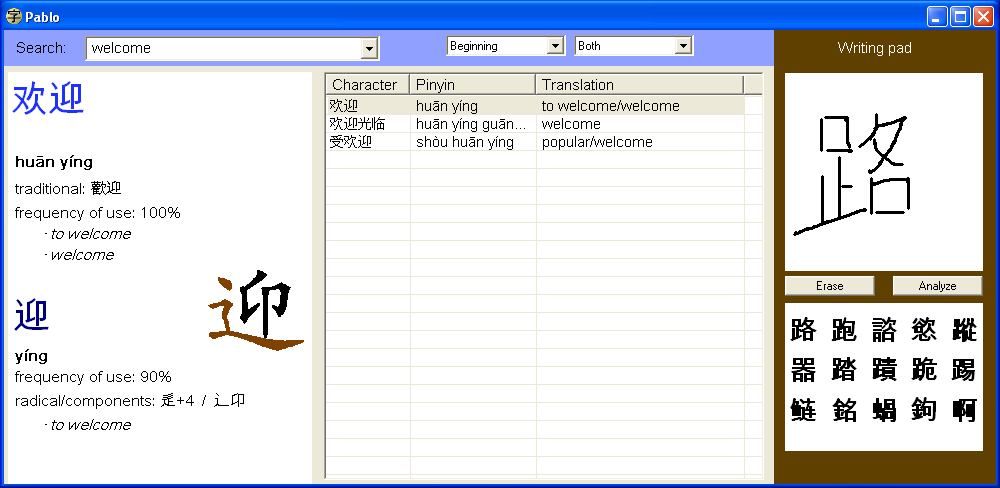
 | Introducing Pablo A treat for Chinese learning beginners: a compact, nifty, featured-packed and free Chinese-English dictionary for Windows. Pablo is probably the best Chinese-English dictionary alternative for beginners. |
- English, Chinese and pinyin
- Search a character from its radical
- (exclusive!) Find a character from its various elements
- Simplified and traditional characters
- Quick navigation (no java, no long downloads!)

- Handwritten character recognition
- The best collection of character animations (4,500 characters!)
- Navigate through search results with one click
Click for screenshot:
Get Pablo at: https://pablopingrid.blogspot.com


96 comments:
Pablo is excellent. I am buying a Palm PDA. I wonder if this would work with it, allowing me to draw the characters with the pen. That would be fantastic.
I'm afraid not, Pablo runs with Windows only. (Thanks for your kind words.)
Hi, is Pablo open-source? And if so what license is it under?
Can it be used on a windows Mobile Platform? I'm currently using Mobile 5
Great product! I was already a fan of Jordan K's java app, and it's great the way you extended it. I noticed your app isn't java based - did you port it to c++?
Good job Emmanuel... Pablo is an excellent program.
I have some questions though:
1)
How do I get the 'speak' option to function? I right click on the character then click on 'Speak' in the menu, but nothing happens. There are no included help/instructions on this too .. or did I miss something?
2)
What programming language(s) did you use to write this software? And how did you incorporate the Flash inside the program?
And I'd like to ask too .. how did the name 'Pablo' come about for a Chinese language software :-D ?
In short, all good expect for the current lack of speak function ~
Answering the previous comments:
Pablo is written in basic, using a compiler called HotBasic. The animation is also written in native basic.
Regarding the "Speak" issue, I'll post a "how to" guide.
And as for the name "Pablo", well, it is mostly casual. I was looking for a name that sounded simple and friendly, and above all, I had no time to spend on marketing research... What came to my mind first was Pablo, I hope you like it! :)
I thought you might like to know you got a feature in the Taipei Times review today - do stay in touch with any updates as this is a regular feature. Many thanks, Jonathan
http://www.taipeitimes.com/News/feat/archives/2008/05/21/2003412471
That's so cool!
Thanks a lot.
Hi, the program is very useful but is there a Multi-radical (like WWWJDIC) search?
Yes, Luke,
"multi-radical" search is one of Pablo's greatest features.
How to:
- right-click on the search box. This brings up the radical list.
- now RIGHT-CLICK on the different radicals that make up the word. (No need to select ALL the character's components. Usually 2 to 4 are enough).
- then go to the 'Results' tab.
Hi Emmanuel.
I'm currently in China and your program looks fantastic but I can't download it! Is there any way you can make it available? I think it would be a huge help in talking to my chinese colleagues.
Dan
Just read the preceding comments by Dan, if Emmanuel thinks it can help, I can help by hosting the file on the "Downloads" section of my site.
Right now I've not done anything; let me know if you need help and let me how I can help.
Hi again.
If you could host it that would be fantastic. Either that or as this program seems to be free would Emmanuel mind if you emailed it to me at DNW1710@hotmail.com?
Hello Ultrabeast,
I agree, that would be great. The source locations of Pablo and Pingrid can be found on this blog.
(I also tried to open an Xdrive account but I get no reply from them, and I'm not even sure it can be accessed from China).
Hello all,
I have posted up the two files for PABLO and PINGRID in the Downloads section of my site.
So if you somehow can't download it here, you may go to
http://ultrabeast.virtualestate.org
to download them.
Emmanuel, you could take a look at that site to see whether it looks OK to you - let me know if there is anything you want to change.
I am currently in China, and I am having great dificulty with your links for download. Is there another way I can get a copy of Pablo ??
Hello Jerry,
have you tried from ultrabeast's site:
http://ultrabeast.virtualestate.org
in the Downloads section
I am unable to access ultrabeast's site from china either.
emmanuel
great stuff, now i carry pablo in my thumb drive as a portable dictionary. are you planning to release a windows mobile version so that it can be loaded into WM phones with touch screen such as the HTC TytnII ? that will be awesome indeed. but still great stuff, appreciated your hard work.
Hello,
for Jerry: I am sorry, at the time I have no solution for you (or for other located in China). I keep trying to find a kind of web-based storage that would be accessible in China.
for ST: Unfortunately, I have no competence in Mobile programming neither the tools to do it, so Pablo will remain a desktop thing for now... Thanks for your post.
This program is fantastic! Thank you so much for creating this. Fyi, I am in China now, and was able to download the file via Xdrive.
I really enjoy both Pingrid and Pablo. The options are what makes these interesting - i already know Japanese, but have never studied Chinese, so the "translation" mode in the game allows me to get a start. Let's see, i learned the 1,945 Toyou kanji, so maybe have about another 1,000 more to go to get fluent in Chinese? And then to work on the pronunciation - oh no :)
Amazing program, I'm studying Chinese and use this daily, the 'Find characters based on this character' is by far my favourite feature.
Something that would be amazing, although I'm not sure what it would entail, is the ability to go back and forward like a web browser or explorer. I often hit 'backspace' by accident trying to make Pablo show the previous result! Force of habit from other apps...
Otherwise stellar work, wish I could get this on my phone! I'll have to settle for DictForMIDs.
Hi,
www.xuezhongwen.net has attributed its animated chinese animations to you. Can anyone use them for non-commercial or commercal use if they attribute them to you? If so, where can I download them?
Thanks,
Detlef.
Correction to my previous post:
I meant:
animated chinese character flash animations
Not:
animated chinese animations
Thanks,
D
For lee-kohl:
the "back" function sounds definitely interesting and... hard to program, so it may take a while...
In the meantime, why not open the drop-down "search box". That gives you access to the latest words you typed.
for d:
Thank you for your interest.
I granted use of the character animations to xuezhonbgwen because they are the authors of the CEDICT database, so it is a sort of reciprocity :)
Apart from that, I reserve the rights over Pablo and the associated data. If you plan to use the data, for instance in a software of your own, please email me to discuss conditions.
to all: thanks for your kind words and good luck!
I have just installed Pablo and got the voice part to work. Here is the whole process I took for my computer running Windows XP:
1. Download and unzip Plabo to Desktop(the easiest part)
2. Follow the Lingoes link provided http://www.lingoes.net/en/translator/speech.htm
3. At the Lingoes webpage look for the following paragraph:
Recommended Excellent TTS Engine
Microsoft Simplified Chinese Voice Package
File Size: 1.55 MB
Download: Mirror 1, Mirror 2
4. Download that and it will appear as "Microsoft_TTS_51_chs.msi"
5. Double click on the msi file once it is downloaded
4. Go to Windows Control Panel and click on the Speech icon. Change the Voice Selection from default to the newly installed one. In my case Microsoft Simplified Chinese. ** Before you close that window, click on the Audio Output button and direct the voice to the correct audio driver which might come with your sound card.
5. That's it and I hope it is helpful for some.
6. Thank you so much Emmanuel for sharing Pablo. : )
Someone please email me and tell me how to use PABLO off my thumbdrive. I use a lot of public computers, so I can't install anything onto a computer directly! I have PABLO on my thumbdrive now, but when I enter an English word, or draw a Chinese character and hit the ENTER key (on key board), everything remains BLANK!
HELP!
michael.e.lovett@gmail.com
Never mind! Found the "data folder", forgot to move it to my PABLO folder I created! Works GREAT! I lived in China five years and I am forgetting so much, so this will help a lot! thanks again! China Mike
hi.. excuse my english,i'm live in indonesia
i agree with add "back" function it look more pretty :)
thanks for you hardwork to make this excellent program.
Will there be any updates released for Pablo in the future?
To zhouyangen:
Yes! There are regular updates for new features or bug fixes, and also to update the word and stroke databases.
E.
Pablo is excellent.100%
Looks good, but I was looking for a dictionary that has radical/strokes lookup. Did I miss something? Thanks for giving the link to DimSum: it does the job for me, but I am always looking for a better mouse-trap.
Hello Bérubé
Yes, Pablo does have radical/strokes lookup. The magic click: RIGHT-CLICK in the Search field. That will bring up the radical list!
In addition, Pablo has an exclusive feature, MULTI-RADICAL search: find a character from its components, even if you don't know which one is the radical. (more details in the help).
Great, I had not seen this feature. I will try it out. It seems to work the way I want it, but I need to get more familiar with it. Being able to look up radicals/strokes makes all the difference. Thank you very much.
1.could you add support so that the definitions tell whether they are noun verb adjective etc..
2.add the ability to add a mp3 audio file to each definition, and once you add the audio file you can have a play audio icon to click on that has the option to play one time or play in a loop with a 3 sec. interval after the audio finishes.
3.i don't know if it does or not but can we add our own custom words to the dictionary, if not this would be a cool function to edit the dictionary.
Great work so far!
Hello laien,
I will try to answer your questions:
1 and 3 relate to the dictionary database. Pablo uses the CEDICT database from mdbg.net
So far it does not contain information about the word type (if is a noun, a verb, etc.) Adding that information would be a huge work. I asked the owners at mdbg and for now they have no plans to include that.
As for adding personalized words, that is possible: go to the mdbg.net website and you can edit the CEDICT.
In the next release, I plan to add an "auto-update" feature to Pablo so that you can get the latest CEDICT database easily at any time.
Regarding question 2 (adding mp3), I do not plan to do that since a lighter alternative exists: if you are interested in having the words pronounced, I recommend you install speech synthesis on your PC with a Chinese voice and then use Pablo's Speak command. Adding individual mp3 files would require much work and an awful lot of memory space.
Details on how to install a Chinese voice are given in another post.
Thanks for using Pablo.
I would like to change the hotkey from F10 to F12, is that possible?
Also the ability to alt-click on a word would be cool.
Hello Geronimo,
your wish is my command...
Version 2.0 has a new Options screen, where you can change the F10 shortcut!
Is Pablo portable? Can I just copy the folder from Program Files onto a USB drive and run it off that on other machines?
David why not just try? I think the answer is probably yes. Just don't forget to download the libraries before you copy the files over to your USB drive.
Another question: Every time I start Pablo I make it full screen and set the search mode to 'Anywhere', but the program never seems to remember these settings. Any way to make it remember?
Awesome program, it's been a mainstay in my Chinese learning. Best features are F10 and 'Find Characters based on this character'. Brilliant work! Thanks so much.
to david:
yes, it should work, and as Lee Kohl said, copy the entire Pablo directory (do not forget the data subfolder!)
to Lee Kohl,
nice suggestion, I will think of it.
By the way, since the 'Favorite words' feature, I too usually set the default to Anywhere: I have marked as favorite all the words I (should) know, and therefore they appear first when I make a search.
david said:
I also like how Pablo uses the stock CC-CEdict from mdbg. I also like the different ways of searching for the words including pin yin, english, and character entry by handwriting recognition. The animation, and the extra information for each character is a great bonus. Thanks for this great dictionary.
The multiple radical lookup is awesome.
Could hybrid lookups of mixed characters and pinyin (aka Pleco) or mixed pinyin and english be incorporated?
Is there a way of updating the CCCEdict from within Pablo?
Do you think you could create another game for testing writing proficiency using a blend of Pingrid's questioning and Pablo's handwriting input? Please...
to david:
I do agree, multiple radical lookup is awesome, I use it all the time. For users who may not be familiar with it: PLEASE have a look at the demo in the help file, you are sure to like it.
hybrid lookups: why not (not a priority, though, unless I get a lot of requests and donations)
Updating the CEDICT from within Pablo: YES, go to the Options screen by clicking the small brown triangle, and go to the Updates tab!
A writing game?
Ha! That is a big one. Food for thought during my next vacations...
amazing
Pablo is pure awesomeness :) Totally worth paying for!
Is it possible to make it minimize to Task Bar and still have it run as usual?
I use WordPad in Windows quite often. can it be written to activate in WordPad also?
Thanks for a great program.
Hello Jack Wan,
I write down the idea of minimizing to task bar. Why not. I understand that the goal is to free some space in the Programs bar, right?
As for WordPad: yes, popups work with it. You have to open Pablo's Options screen, go to the "Popup" tab and add wordpad.exe to the list of supported programs.
Thanks for your kind words.
Hi Emmanuel,
I tried but still couldn't get Pablo to work in WordPad by adding wordpad.exe into the Popups list. There is something else that needs to be done here?
As well, I thought of another useful addition to the search could be to correlate numbers with the phonetic sounds.
Say, I could narrow my search by typing shang4 hai3 to get 上海 or shang1 hai4 to get 伤害.
Or just leave it without the numbers and get all the phonetic possibilities in the search result.
Cheers
To Jack Wan: sorry for Wordpad, on my computer it worked just fine (after restarting Pablo and Wordpad).
Regarding the pinyin search, you can do what you describe:
try searching for shang4hai or shang4hai3
And put ? to allow any tone
Ex: shang?hai
I am using vista. I cannot get pingrid to install. It keeps saying that it is " trying to install check_for_updates but cannot create this file.
Any thoughts?
Hi Emmanuel,
Thanks very much for Pable and Pingrid. Just wondering, does Pingrid recognize wordlist with traditional characters ?
Regards.
JohnC
Hello john,
Pingrid does recognize traditional characters. You have do to manually a small operation:
. make sure Pingrid is closed
. backup the prefs.txt file (for safety)
. open prefs.txt
. replace tradorsimpl=Simplified
by tradorsimpl=Traditional
. save and restart Pingrid
Thanks, Emmanuel.
I have tried changing it but only the words that do not have traditional set shows up in Pingrid. Did I miss out any step ? (I have already changed it to tradorsimpl=Traditional)
Thanks again.
John
Excellent program but my characters are showing up as blank boxes. What did I do wrong or is there something else I needed to install?
Hello Trudy, it sounds like a font problem. Make sure:
- you have set up Windows for display of Asian characters (it is an option in the "International" control panel-- or similar name)
- best appearance is obtained with the "Arial Unicode MS" font (it is a standard font, that you can get with microsoft office, for example.
Thanks Emmanuel. I think you're right but I need to dig out my Windows Installation disk to change the regional and language settings.
Many thanks to Emmanuel for Pablo. I relly like this software, especialy the "writing pad" feature as it makes chinese character recognition very easy. I wonder if you have plans to release version of pablo for smartphones. the "writing pad" will be very useful with touch-screen mobiles if Pablo is available on smartphones. i belive features currently available woth Pablo have great potential for mobile phone use.
Thanks again for such a great software.
I have used Pablo on other computers before and am trying to download it to my new laptop, but where the download button is supposed to be, there is just a blank white space. I've tried both with firefox and IE. Does anyone know what might be causing this? Thanks.
Hello Aaron,
Could it have to do with Flash? The page relies on it to display the download box.
Here is an alternate link:
http://www.box.net/files#/files/0/f/21051928/Latest_updates
I've tried both the link and updating my flash. Neither seem to work. My browswer won't even allow the site to load. I'll keep trying, but do you have any other advice? Thanks. I love this app!
-Aaron-
Aaron you need scripting turned on(turn off java script blocker) and flash installed(best to update to flash 10.1 to avoid the security problems in earlier versions).
Emmanuel great program!
Is there any way to enable the popups for web browsers ?
And is there anyway to hide the writing pad when I don't need it ?
You did a fantastic job! Moreover you offered all for free, this is amazing, the feature I was looking for age was to have a kind of software that emulate Skritter offline http://www.skritter.com/demo
and your Pingrid do the job perfectly!
In addition I disabled all the plugin I used to read chinese on firefox and starting to use your Pablo to read;)
I have no word to describe your wonderful job, you deserve to stay among the best software applications for learning chinese (pleco, rosetta stone, wenlin, skritter etc...) thanks from Italy!
Could you port Pingrid to Iphone, it would be a free and offline alternative to Skritter...
Thanks for take it in consideration!
Hello Anonymous,
I am sorry, iphone programming is completely out of my range. Remember, this is only an amateur effort!
You can use Pablo also with the German HanDeDict dictionary. You have to do 3 things taking for instance the file "handedict_nb.u8"
1st
replace all line feeds LF (as separators between each data record) by CRLF (carriage return + line feed)
2nd
replace the letter "ü" in the PinYin-Section by "u:" as the English alphabet does not use the ü. In order the keep all the Üs in the German translation always invlude the tone number in the search/replace-procedure
so for example:
search ü3
and replace by u:3
3rd
give the changed file the name
cedict_ts.u8
and place it in the folder "data" in the installation folder of Pablo
After starting the application Pablo will recognise a new dictionary and take 1 minute or 2 to install it properly.
That's it
Have fun :)
Heinz
Dear Heinz Falankefu,
I like the idea of compatibility with HanDeDict. Would you like to be a tester for an updated version of Pablo supporting it?
If so, send me a private message with your email to ehaton (at) gmail.com
Emmanuel
for German users: give a try to new version 2.5, it adds support for HanDeDict- just copy the HanDeDict dictionary file!
Emmanuel, Pablo is wonderful.
I like the thinking behind the new search functionality. I may have a found a bug for you. Try searching for 的人.
I recommend Pablo to all my friends learning Chinese :)
are this need a : .Net framework?
Dear beginaprogram,
no .net is needed, neither is java. Pablo is a standalone program.
Dear fzzylogic,
I am very happy that you like Pablo.
About the search for 的人, the bug is now solved.
Hi!
I just downloaded Pablo and it seems to be an useful program. Thanks so much! I was just wondering if Pablo would allow me add the characeters I learned in so I can create my own word bank and also allow me review them? Thanks for your time.
Dear Minghui,
yes, Pablo has a feature to manage lists, as it lets you mark "favorite" words. For an explanation, see the manual or the online forum at:
http://pablopingrid.freeforums.org/what-to-do-with-favorite-words-t6.html
Hello!
Pablo seems to work fine on my computer (I haven't had a chance to use it yet), but I have a problem getting the cedict into the program. I've tried manually downloading the cedict dictionary from mdbg, but the data subfolder won't allow me to save the cedict file in it, and says I "need to get permission from the author/creator"! When I've tried to automatically download the dictionary through the Pablo program, I get an error message, and the file doesn't download. Am I not supposed to save the dictionary zip file in Pablo's data folder?
Dear Mary,
Maybe the download process has been interupted and some open process impedes updating the dictionary file. When you restart your computer, try again updating CEDICT from Pablo (in the Options screen).
If you want to do it manually, you have to copy the file cedict_ts.u8 into Pablo's 'data' subdirectory.
I cannot get the word input facility to work. When the cursor is focussed on the search field, the program recognises a right click, or space bar, but will not accept the ENTER key. I'm using XP SP3. Any known problems. The Pingrid application has installed correctly and shows up on the start menu whereas Pablo is not on the menu.
Dear Richard,
Very sorry for this, it was a bug with the setup. It is fixed in new version 2.6c
You can also do the following:
Click on the small brown triangle to open the Options window, go to 'Pablo updates'. In the CEDICT section, click the Download button.
To DanWatson.
I had the same trouble in China. I contacted Box.Net and they gave me the following link:
http://www.boxcn.net/pablopingrid/1/21051928/227855886
On that webpage you can initially only download the Pablo.exe file. That doesn't work due to Box.Net Security Restrictions. The way to do it is: click on the Pablo.exe file to download it, wait a bit, clcik on the back button in your browser. Now you will see you can also download the zip-files. Good luck.
Note: I had this problem downloading Pablo 2.5c, but now with the newer version, the same link also allows you to download Pablo 2.6c.
Hi Emmanuel,
Your programs (both Pablo and Pingrid) are fantastic. I've been struggling to learn Chinese for years and now I feel I'm finally starting to consolidate some of the progress.
A million thanks!
Hi Emmanuel, thank you so much for pingrid!!! i've been using it for a couple of weeks now and it's been a lot of fun and i'm learning so much chinese it's kinda ridiculous :-)
i just downloaded pablo but can't figure out how to work the popup in firefox. nothing will pop up. I changed the shortcut keys even and it didn't work. please help :-). I can't wait to use pablo to the fullest extent. i love your work!
Dear Libby,
Unfortunately popup definitions are a strange beast and they are far from perfect. Actually they only work well under Windows XP. Under other systems, I recommend turning them off (Options screen >> Popup definitions tab).
Hi Emmanuel,
the pop up function doesn't work in windows 8 could you help me out on this?
Are there any plans to provide PABLO for Android or Mac platforms??? I have it installed and working in my PC's but I also have an Android smartphone as well as Mac.
Dear Sanchezantonj, I am sorry, there are no plans for other systems than Windows... they are simply beyond my humble programming skills.
It's a very simple but efficient dict. . I draw characters and get the meaning in English but i cannot enter character in search as i don't have MS IME or any other software and the result shown in Pablo also does't shows characters but boxes
Dear Hrid Bijoy,
Indeed, Asian characters must be enabled on your system (that is done in the control panel called "Regional configuration" or "Languages").
I hop you'll like Pablo.
Emmanuel , I am using Windows XP sp3 so it was not enabled and i did't have cd so after many attempts i finally got solution http://recentsolutions.blogspot.in/2012/09/east-asian-language-pack-for-windows-xp.html
downloaded MS IME from here and now i can type chinese character too but best IME is by google but that also needs MS IME search google pinyin input and downloaded from google chinese
Hi, Emmanuel. I really love your dictionary. It is simple, yet very effective. It helped me so much in my Chinese learning and I appreciate it so much.
Post a Comment